 anmol.gakhar
Introduction -
A restaurant POS should do more than generate bills. It sits at the center of the customer order, kitchen, table, payment, inventory, and accounting workflows. When these processes operate separately, even a busy restaurant can lose time, create errors, and struggle to understand what is actually happening across the business.
This is where Zoho POS for Restaurants becomes interesting. Zoho launched its restaurant-focused POS in India in October 2026, bringing restaurant operations such as menus, orders, tables, kitchen workflows, inventory, billing, and reporting into a connected platform.
For restaurant owners, the bigger opportunity is not simply replacing an existing billing system. It is designing a connected operating system around the way the restaurant actually works.
What Is Zoho POS for Restaurants?
Zoho POS for Restaurants is a cloud-based point-of-sale platform designed specifically around restaurant workflows. Instead of treating POS as only a checkout system, it connects front-of-house and back-of-house activities, including orders, tables, kitchen operations, menus, inventory, purchasing, payments, and reporting.
This matters because restaurants rarely operate through one transaction path.
A customer might order at a table, another customer may order at the counter, while online orders arrive through delivery platforms. At the same time, the kitchen needs accurate order information and the purchasing team needs to know what ingredients are being consumed.
A connected POS can make these workflows part of one operational system instead of forcing employees to manually move information between different tools.
Why Do Restaurants Need More Than a Traditional POS?
Many restaurants start with a simple POS because billing is the immediate requirement. The problem appears later.
As order volume increases, restaurants add delivery channels, additional locations, new menus, loyalty programs, accounting systems, inventory tools, and other software. The POS may continue handling transactions, but the wider operation becomes fragmented.
For example, imagine a restaurant where an item sells out during the evening. If inventory, menu availability, online ordering, and purchasing are disconnected, employees may need to update several systems manually.
The result is not just extra work. Customers may order unavailable items, kitchen staff may receive incorrect information, and managers may discover the problem only after the shift.
Zoho POS is designed to bring these operational areas closer together. Its restaurant platform supports centralized menus, order management, kitchen routing, table service, inventory, purchasing, payments, and reporting.
How to Build a Smarter Restaurant Operation With Zoho POS?
The value of Zoho POS depends heavily on how it is implemented. Simply activating the software does not automatically create a better restaurant operation.
The first step is to map the complete order journey.
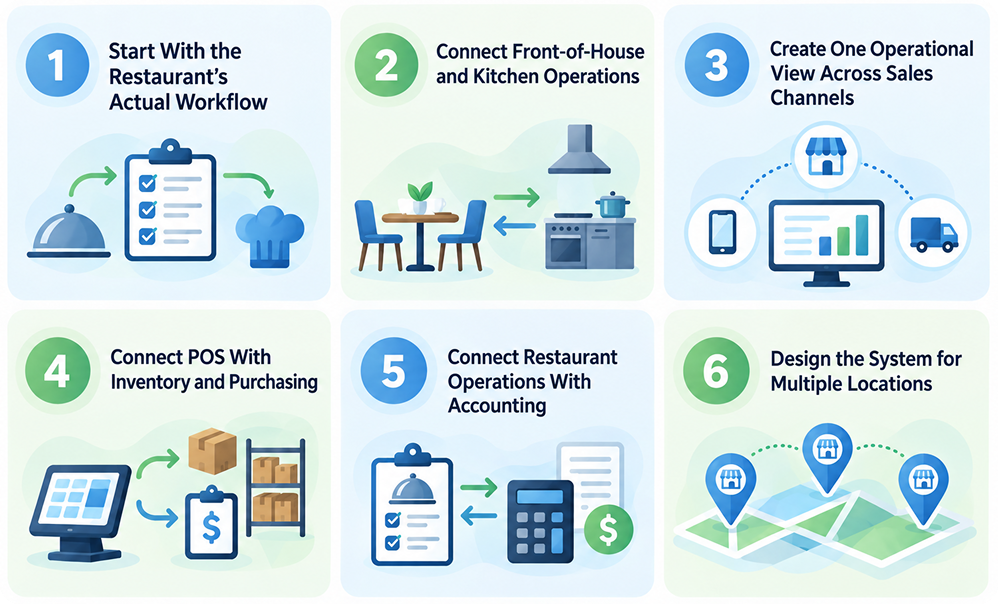
1. Start With the Restaurant's Actual Workflow
Before configuring anything, document what happens from the moment a customer places an order until the payment is recorded and the stock is updated.
For a dine-in restaurant, this might look like:
Customer → Table → Waiter → POS → Kitchen → Order completion → Billing → Payment → Reporting
For a cloud kitchen, the process may look completely different:
Online order → POS → Kitchen → Preparation → Dispatch → Payment → Inventory
The implementation should reflect these differences.
This is one area where working with experienced Zoho consultants can make a meaningful difference. A consultant can review existing processes, identify unnecessary manual steps, and determine which workflows should be configured, automated, or integrated.
Raah Consultants takes a process-first approach to Zoho projects, covering discovery, implementation, customization, integrations, training, and ongoing support.
2. Connect Front-of-House and Kitchen Operations
A restaurant loses efficiency when waiters, cashiers, and kitchen staff rely on verbal communication or paper-based handoffs.
Zoho POS allows orders to be connected with kitchen stations so the right items can reach the right preparation area. For restaurants with multiple kitchen sections, this can reduce unnecessary coordination between the floor and kitchen teams.
The implementation question is not simply whether the feature exists.
The important question is: How should your kitchen be structured inside the system?
A consultant can help define kitchen stations, order routing rules, item structures, modifiers, user permissions, and operational workflows based on how your restaurant actually functions.
3. Create One Operational View Across Sales Channels
Restaurants increasingly sell through multiple channels.
Dine-in, takeaway, counter sales, kiosks, and delivery platforms can all create separate order streams. Zoho POS supports a centralized approach to these orders and supports integrations with platforms.
This creates an opportunity to standardize how orders enter the business.
Instead of employees constantly switching between systems, the restaurant can design a workflow where order information, item availability, preparation, billing, and reporting are connected.
For a growing restaurant, this becomes even more important when opening additional locations.
4. Connect POS With Inventory and Purchasing
Restaurant inventory is different from conventional retail inventory.
A restaurant does not simply sell a finished product. Ingredients are purchased, stored, prepared, consumed through recipes, and replenished.
Zoho POS supports recipe-based inventory management, stock tracking, purchasing, vendors, and related operational workflows.
This is where a properly designed Zoho integration can create significant value.
For example, POS transactions can feed operational and accounting workflows, while inventory information can help purchasing teams identify what needs to be replenished.
Zoho Integration Services can be relevant when a restaurant needs to connect Zoho with accounting systems, payment platforms, custom applications, ERP systems, or other business software.
5. Connect Restaurant Operations With Accounting
A POS should not become another isolated system for the finance team.
Zoho POS integrates with Zoho Books, allowing restaurant transactions to connect with accounting workflows. Zoho also supports integrations with payment providers and other business applications.
This can reduce repetitive data entry and create a more connected flow between sales and finance.
If a restaurant already uses multiple accounting or business applications, the implementation should begin by mapping which information needs to move between systems.
6. Design the System for Multiple Locations
A restaurant with one outlet has very different requirements from a chain with ten or fifty locations.
Multi-outlet businesses need central control without making every outlet operate identically.
Zoho POS supports centralized management of menus, availability, pricing, purchasing, stock movement, user access, and reporting across outlets.
A good implementation therefore needs to define what should be controlled centrally and what should remain outlet-specific.
For example, corporate management may control the core menu and brand pricing, while individual outlets may have different availability, stock, or operating requirements.
Can Zoho POS Be Customized for Different Restaurants?
Yes, but customization should start with the operating model rather than the software.
A quick-service restaurant, cafe, bakery, cloud kitchen, and full-service restaurant may all require different workflows.
A cafe may prioritize counter ordering and takeaway. A full-service restaurant may need detailed table management and waiter ordering. A bakery may need recipe-based inventory and pre-orders. A multi-location chain may prioritize centralized control and outlet reporting.
Zoho POS is designed to support different restaurant models, including quick-service restaurants, casual and full-service restaurants, cafes, bakeries, cloud kitchens, and multi-location businesses.
When Should a Restaurant Hire a Zoho Consultant?
A simple restaurant with straightforward billing may be able to handle a basic setup internally.
Professional implementation becomes more valuable when the business has multiple outlets, complex inventory, delivery channels, accounting integrations, custom workflows, existing software, or plans for expansion.
A consultant can help with requirements discovery, system architecture, data migration, integrations, customization, testing, staff training, and post-launch optimization. These are also common areas covered in a structured Zoho implementation project.
The biggest benefit is often avoiding decisions that become expensive to change later.
How Raah Consultants Can Help With Zoho POS?
Zoho POS can become much more valuable when it is implemented as part of a broader business system.
At Raah Consultants, we can help businesses assess their existing processes, identify the right Zoho applications, design workflows, configure the platform, connect third-party systems, and support the implementation.
For restaurants, that could mean connecting POS with accounting, inventory, customer communication, payments, reporting, or other operational systems.
If your business already uses several Zoho applications, a broader Zoho One implementation can also be evaluated to determine whether additional business processes can be brought into the same ecosystem. Raah's implementation approach focuses on connecting business processes rather than simply activating individual applications.
What Should You Plan Before Implementing Zoho POS?
The best time to make implementation decisions is before the system goes live.
Start by documenting your order channels, restaurant locations, menu structure, kitchen stations, inventory process, payment methods, accounting system, delivery platforms, user roles, and reporting requirements.
Then decide which processes should remain manual and which should be automated.
Finally, identify the integrations that are essential to daily operations. This prevents the common mistake of configuring the POS first and discovering later that it does not fit the rest of the business.
Final Takeaway
Zoho POS for Restaurants is more than a billing solution. Its real potential comes from connecting the operational chain from order capture and kitchen preparation to inventory, purchasing, payments, accounting, and reporting.
For restaurants considering Zoho POS, the key question should not be "What features does the POS have?" That can be addressed in a separate feature-focused guide.
The more important question is "How should we design Zoho POS around our restaurant?"
That is where consulting and implementation become valuable. A well-planned Zoho POS setup can create a foundation for automation, integrations, better operational visibility, and future expansion without forcing the restaurant to rebuild its systems every time the business grows.
Frequently Asked Questions
Zoho POS for Restaurants is a cloud-based point-of-sale solution designed for restaurant operations. It connects areas such as ordering, tables, kitchen workflows, billing, inventory, purchasing, payments, and reporting.
Yes. Zoho POS is designed for different restaurant formats, from smaller single-location operations to growing multi-outlet businesses. The right configuration depends on the restaurant's order volume, workflows, integrations, and growth plans.
Yes. Zoho POS supports connections with Zoho applications, payment providers, accounting software, and third-party systems through supported integrations and APIs.
Not every restaurant needs professional implementation. However, a consultant can be useful when the business requires integrations, customization, multiple outlets, complex workflows, migration, automation, or connections with an existing technology stack.
Yes. Zoho POS provides customization and automation capabilities, while the exact configuration should be based on the restaurant's operational requirements.
Yes. Zoho POS can integrate with Zoho Books to connect restaurant sales and transaction information with accounting workflows.