 anmol.gakhar
Introduction -
Sales teams spend a surprising amount of time on work that has little to do with actually selling.
Updating CRM records. Assigning leads. Sending follow-up emails. Checking which opportunities need attention. Creating tasks. Preparing quotes. Looking through old conversations before calling a prospect.
These tasks are important, but they can also take hours every week.
Zoho CRM has been adding more ways to reduce this manual work. Alongside traditional workflow automation and Zia's AI capabilities, businesses can now use Zia Agents to handle specific CRM tasks and processes.
For businesses already using Zoho CRM, working with experienced Zoho CRM experts can also help identify which processes are worth automating and which are better handled through standard CRM workflows.
The important point is that this is not about replacing your sales team. It is about giving them a system that can take care of routine work while your people focus on prospects, customers and closing business.
In this guide, we'll look at what AI agents in Zoho CRM are, where they can help, which processes are worth automating, and what businesses should consider before implementing them.
What Are AI Agents in Zoho CRM?
An AI agent is a software system designed to carry out a particular task or series of tasks based on instructions, business rules and available information.
Traditional CRM automation usually works like this:
If X happens → do Y.
For example:
If a new lead is created, assign it to a sales representative and send a welcome email.
welcome email.An AI agent can work with more context and perform a broader set of actions.
For example:
A new lead comes in → review the available information → determine whether the lead meets certain criteria → send the appropriate response → schedule a meeting when appropriate → update the CRM → notify the sales representative.
Zoho provides Zia Agents that can be created for specific business requirements and deployed within Zoho CRM. Zoho's current documentation gives examples such as sales assistance, quote creation and account management.
The exact tasks an agent can perform depend on how it is configured, what information it can access and what permissions it has.
That makes implementation and proper configuration important.
AI Agents vs Traditional CRM Automation
It is easy to assume that AI agents are simply a new name for workflow automation. They are not exactly the same.
Experienced Zoho consultants can help businesses determine where traditional workflow automation is sufficient and where AI-assisted processes can provide additional value.
Traditional automation is extremely useful when you have a process that follows clear, predictable rules.
For example:
- New lead created: assign owner
- Deal moved to proposal stage: create follow-up task
- Invoice marked paid: update customer status
- Renewal date approaching: notify account manager
These processes don't necessarily require AI.
AI becomes more useful when the process involves reviewing information, understanding context or deciding what action should happen next.
| Traditional Automation | AI Agents |
| Follows predefined rules | Can work with instructions and context |
| Best for predictable processes | Useful for more flexible processes |
| Usually trigger-based | Can be triggered by conditions or manually |
| Performs defined actions | Can carry out multiple related actions |
| Easier to configure | Requires more planning and testing |
| Ideal for repetitive tasks | Useful for tasks involving information and decisions |
The two approaches should not compete with each other.
In many businesses, the best CRM setup will use both.
What Can AI Agents Do in Zoho CRM?
The possibilities depend on your CRM setup, available features, permissions and integrations. But there are several areas where businesses can benefit.
1. Qualifying New Leads
Not every lead deserves the same level of attention.
A business may receive leads from:
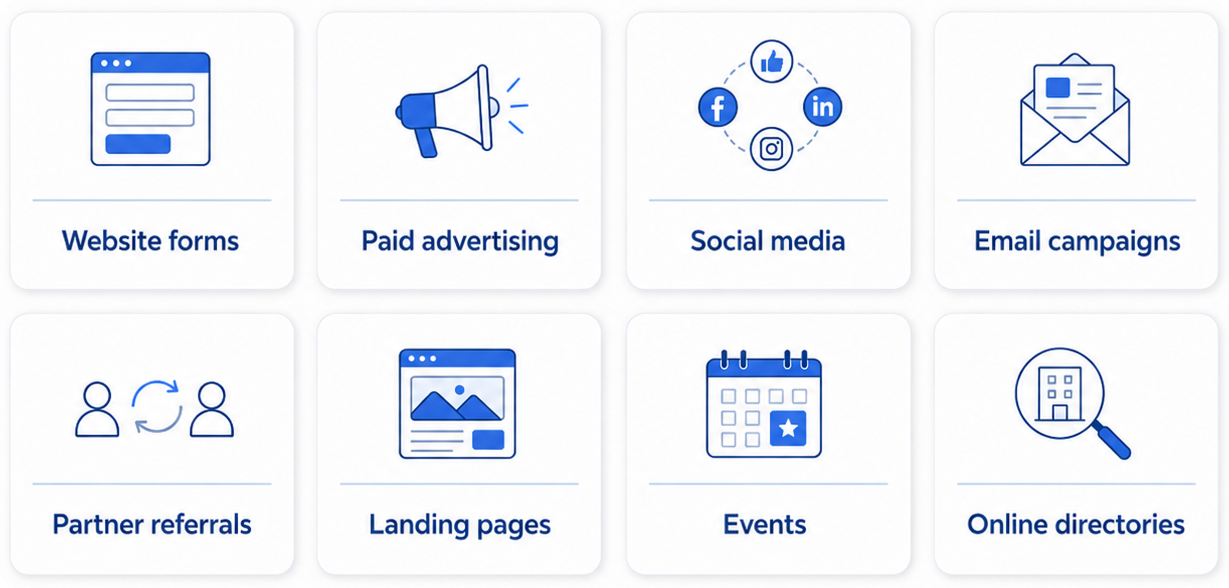
An agent can help review available lead information and support the qualification process.
For example, a business selling enterprise software may want to prioritise companies based on:
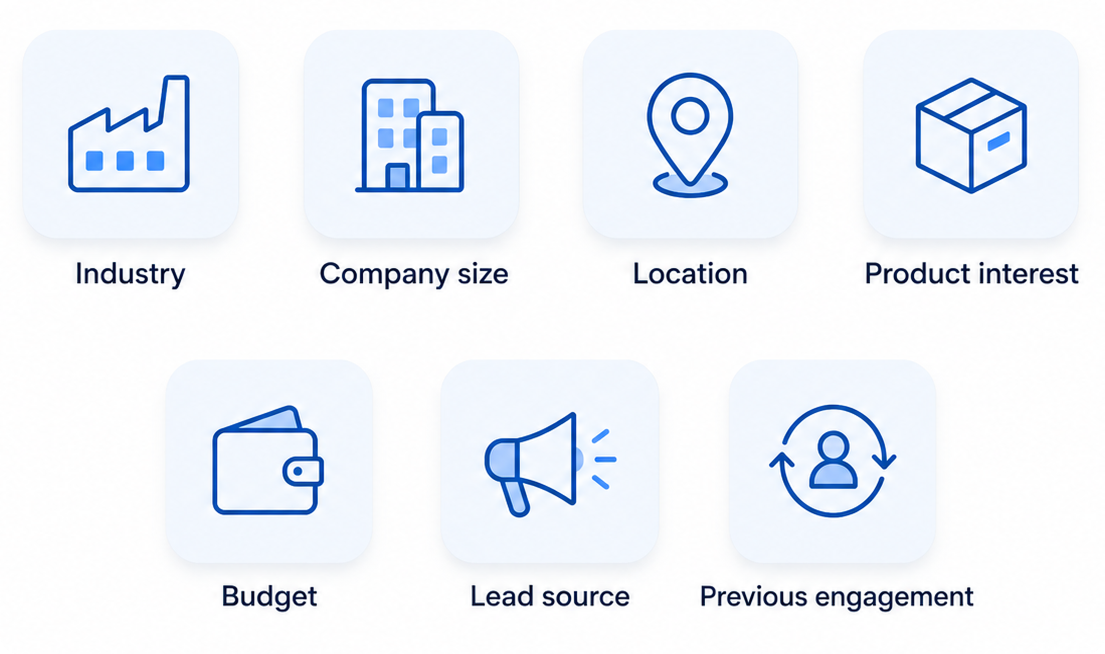
Zoho CRM already provides AI-powered lead scoring through Zia, which can use CRM data and engagement signals to help sales teams prioritise prospects.
The advantage is simple: sales representatives can spend more time on leads that deserve immediate attention.
2.Automating Initial Follow-Ups
A common sales problem is not a lack of leads.
It is a lack of consistent follow-up.
A salesperson may receive a lead, make one call, send an email and then get distracted by other opportunities.
An automated process can make sure the lead does not simply disappear from the pipeline.
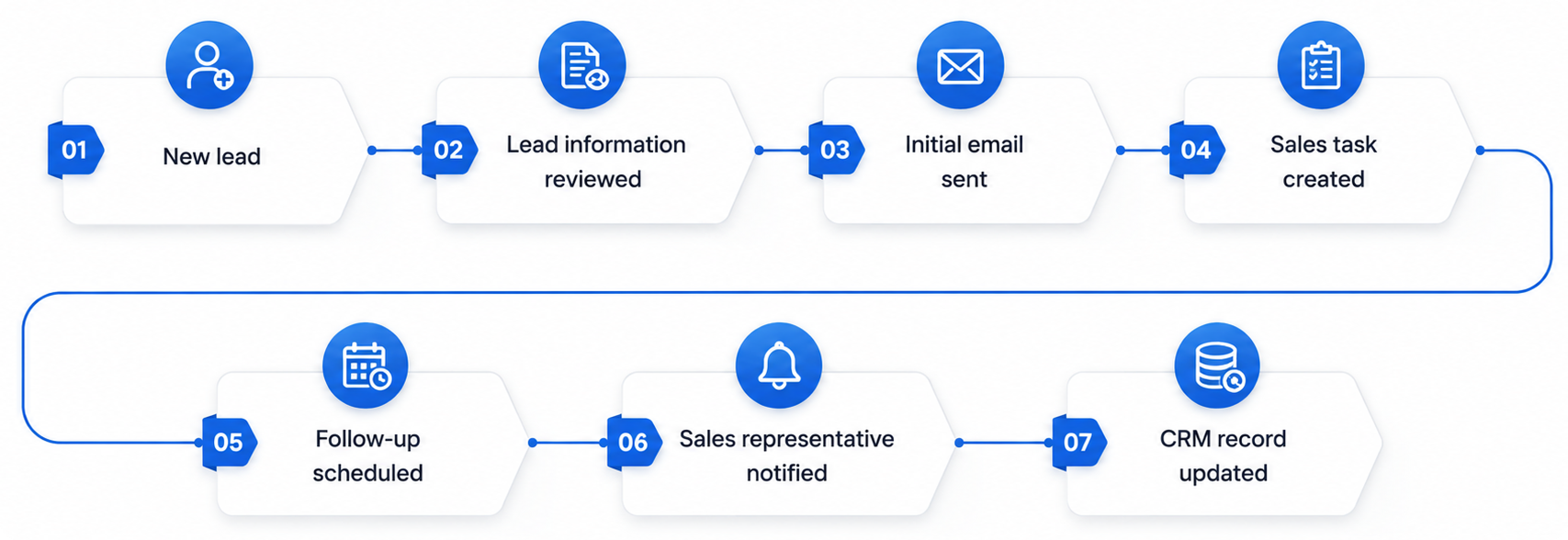
The specific steps can be designed around the company's sales process.
Zoho's current AI sales automation capabilities combine conventional workflow automation with AI features and agents to support activities such as lead qualification, follow-ups and sales tasks.
3.Identifying Leads That Need Attention
Your CRM probably contains opportunities that have gone quiet.
Perhaps:
- No one contacted the prospect recently.
- A proposal was sent but there was no response.
- A deal has remained in the same stage for too long.
- A customer has not responded to several messages.
- A renewal is approaching.
- A high-value opportunity has no upcoming activity.
These situations are easy to miss when sales managers are looking after dozens or hundreds of opportunities.
AI-assisted CRM processes can help identify these patterns and bring them to the team's attention.
The goal is not to let software make every sales decision.
The goal is to make sure important opportunities don't get buried inside the CRM.
4.Helping Salespeople Decide What to Do Next
A CRM contains a huge amount of information.
The problem is that salespeople don't always have time to go through it.
Consider a salesperson opening an opportunity that has been active for several weeks.
They may need to review:
- Previous emails
- Calls
- Notes
- Tasks
- Deal stage
- Contact information
- Previous proposals
- Customer interactions
Zoho's Zia capabilities can provide record insights, recommendations and summaries to help sales teams understand customer and deal information more quickly.
This can make CRM data more useful in day-to-day sales work.
5.Creating Quotes Faster
Preparing quotes can be repetitive, particularly when sales teams work with standard products, services or pricing structures.
Zoho's current Zia Agents documentation includes a Quote Creation Agent example that can generate quotes using information from a deal and predefined formats.
For businesses handling a high volume of similar quotations, this type of automation can reduce manual work.
It can also help sales representatives spend less time copying information between systems.
6.Keeping CRM Records Updated
One of the biggest CRM problems is incomplete data.
Salespeople may forget to:
- Update a deal stage
- Add call notes
- Create a follow-up task
- Update contact information
- Record an important customer interaction
- Assign the correct owner
- Add relevant information after a meeting
Over time, the CRM becomes less reliable.
That creates another problem.
When managers cannot trust the data in their CRM, reports and forecasts become less useful.
AI-assisted processes can help reduce some of this manual work, while traditional workflows can handle predictable updates.
Zoho also provides features that help users create workflows and perform CRM actions through Zia, including tasks such as updating fields, creating tasks and meetings, and triggering notifications.
7.Re-Engaging Old Leads
Most businesses have a database full of old leads.
Some may have been contacted once.
Others may have received a proposal but never responded.
Some may simply have been forgotten.
Instead of treating every old lead the same way, businesses can create a process to identify potentially valuable opportunities.
For example:
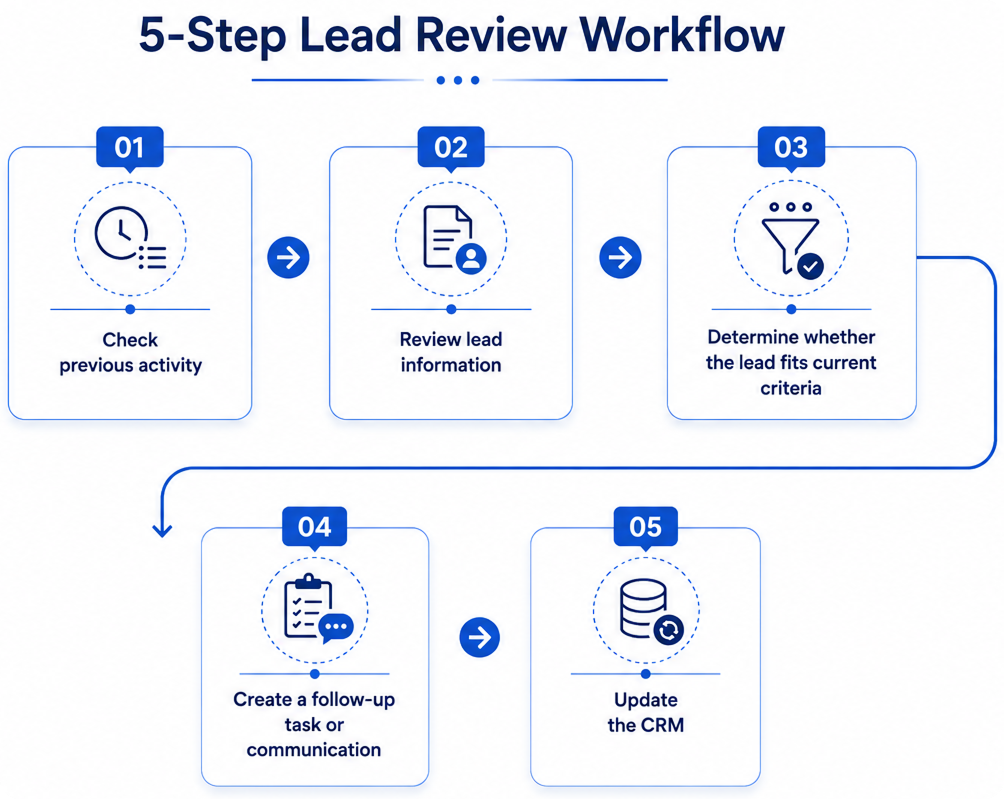
This can help businesses get more value from their existing database instead of constantly relying on new leads.
8.Supporting Customer Retention
AI agents are not limited to acquiring new customers. They can also support existing account management. For example, a business could monitor accounts for signs such as:
- Reduced engagement
- Delayed renewals
- Declining activity
- Open support issues
- Missed follow-ups
- Changes in account status
Zoho's documentation gives an example of an Account Manager agent that can identify potentially at-risk accounts and suggest or trigger retention actions based on defined conditions.
For businesses with recurring customers, this can be particularly valuable.
Keeping an existing customer is often more efficient than constantly replacing lost customers with new ones.
10 Sales Processes You Can Automate in Zoho CRM
Before implementing an AI agent, look at the repetitive work your sales team performs every day.
Some common opportunities include:
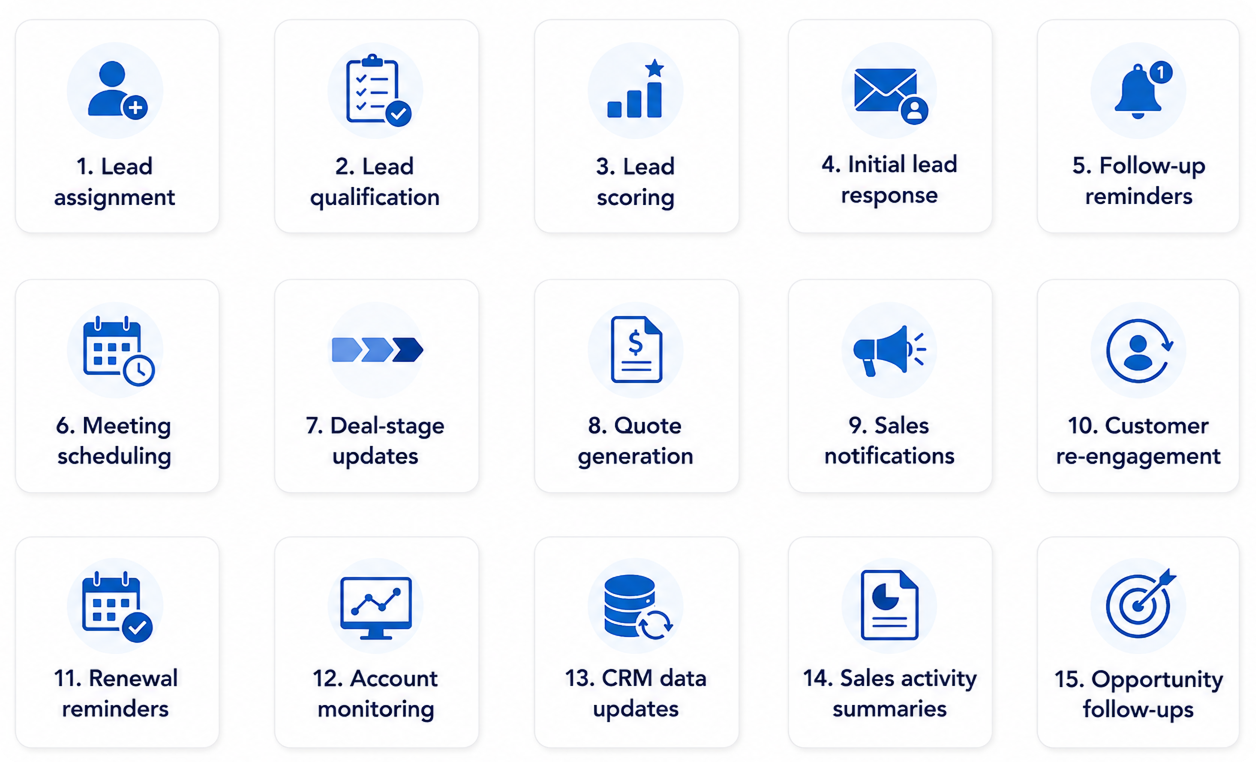
Not every process needs an AI agent.
Some are better handled using standard Zoho CRM workflows, while others may benefit from Zia or a more advanced agent.
That distinction matters.
When Should You Use AI Agents Instead of Simple Automation?
A common mistake is trying to add AI to every CRM process.
You don't need AI for everything.
If the rule is straightforward, traditional automation may be the better choice.
For example:
When a deal moves to "Closed Won", create an onboarding task.
There is no reason to make this unnecessarily complicated.
But consider a process such as:
Review an incoming lead, assess available information, determine whether it meets our qualification criteria, provide an appropriate response and notify the correct salesperson.
That involves more context and multiple steps.
This is where more advanced automation and AI-assisted processes can become useful.
A good Zoho CRM implementation should therefore start with the business process, not the technology.
How to Implement AI Agents in Zoho CRM?
Adding an AI agent should not begin with:
"Where can we add AI?"
Start with:
"Where is our sales team wasting time?"
That question usually produces much better results.
Step 1: Audit Your Existing CRM
Review:
- CRM modules
- Fields
- Workflows
- Lead sources
- Sales stages
- Integrations
- Existing automations
- Reports
- User roles
- Data quality
Find out what is already working and what is causing problems.
Step 2: Identify Repetitive Work
Speak with your sales team.
Ask them:
- Which CRM tasks do you repeat every day?
- Which tasks do you regularly forget?
- Which processes require copying information?
- Which leads take too long to qualify?
- Where do opportunities get stuck?
- Which customer follow-ups are often missed?
These answers will give you a much better automation roadmap.
Step 3: Define the Business Rules
Before an agent takes action, determine what it should and should not do.
For example:
- Which leads qualify?
- Which customers should receive follow-ups?
- When should a salesperson be notified?
- Which records can be updated automatically?
- Which actions require human approval?
Clear rules reduce mistakes
Step 4: Decide Which Automation Method Fits
You may need:
Zoho CRM workflows
for simple rule-based tasks.
Ziafor insights, predictions, recommendations and AI-assisted CRM activities.
Zia Agentsfor more advanced processes involving multiple actions and business context.
Zoho's current agent setup allows businesses to define an agent's purpose, instructions, knowledge, tools and connections before testing and deploying it.
Step 5: Test Before Going Live
Do not immediately give an automated system permission to change important CRM data.
Test it with sample scenarios.
Check:
- Did it identify the correct records?
- Did it follow the business rules?
- Did it perform the correct action?
- Did it update the right fields?
- Did it notify the right person?
- What happened when the information was incomplete?
Testing is particularly important when the process affects customers or sales opportunities.
Step 6: Monitor the Results
Once the process is live, monitor it.
Look at:
- Response time
- Lead conversion
- Follow-up completion
- Sales activity
- Data accuracy
- Automation errors
- User adoption
- Time saved
The purpose of automation is not to have more automation.
The purpose is to improve the business process.
What Businesses Should Consider Before Using AI in Zoho CRM?
AI capabilities can be useful, but they should not be treated as a shortcut for poor CRM processes.
Before implementation, consider the following.
Your CRM data
If your CRM contains outdated, duplicate or incomplete information, the results will naturally be limited.
Your sales process
If your sales process is unclear, automating it may simply make a bad process run faster.Permissions
Determine what the system can view, change and execute.
Zoho's current agent deployment options include permission controls and audit visibility for agents deployed as Digital Employees.
Human oversight
Some decisions should remain with your sales team.For example, an automated process may identify an opportunity, but a salesperson may still need to decide how and when to approach the customer.
Integrations
If your business uses accounting software, marketing platforms, customer support tools, payment systems or other applications, consider how those systems fit into the overall process.
A CRM should not operate as an isolated database.
How a Zoho CRM Consultant Can Help?
The technology is only one part of the project.
The bigger challenge is deciding what should be automated and how the automation should fit your business.
A Zoho CRM consultant can help with:
- CRM process audits
- Workflow design
- CRM customization
- Lead management
- Sales automation
- AI implementation
- Zia configuration
- Agent setup
- Third-party integrations
- Data cleanup
- CRM migration
- User training
- Reporting and dashboards
- Ongoing CRM optimization
This is particularly useful when your CRM has become complicated over time.
You may have dozens of workflows, custom fields, integrations and processes that were created at different stages of business growth.
Before adding another automation, it is often worth reviewing the entire system.
Is AI Automation Right for Your Business?
AI agents can make sense if your team is dealing with a large number of repetitive CRM activities.
You may want to explore it if:
- Salespeople spend too much time updating CRM records.
- Leads are not followed up consistently.
- Managers struggle to identify important opportunities.
- Your team spends too much time preparing quotes.
- Your database contains many inactive leads.
- Sales processes involve several repetitive steps.
- You already use Zoho CRM but are not getting enough value from it.
- Your business uses several applications that need to work together.
On the other hand, if your CRM is still poorly structured, the first step may simply be to clean it up and establish a clear sales process.
AI should come after the fundamentals are in place.
The Future of Zoho CRM Is More Than Automation
Traditional automation is still going to be important.
Businesses will continue to use workflow rules, notifications, scheduled actions and integrations because they are reliable ways to handle predictable tasks.
What is changing is the ability to combine these processes with systems that can understand more context and assist with more complex work.
Zoho is moving in this direction through Zia, Zia Agents, AI-powered scoring, workflow suggestions and newer CRM assistants.
For businesses, the practical question is not:
"Should we use AI because everyone is talking about it?"
The better question is:
"Which parts of our CRM process can be improved with better automation?"
That approach leads to more useful implementations and better long-term results.
Ready to Make Your Zoho CRM Work Smarter?
If your sales team is spending too much time on repetitive CRM tasks, the first step is to identify where automation can actually make a difference.
Raah Consultants can help you review your existing Zoho CRM setup, identify automation opportunities, configure workflows and integrations, and build a CRM environment around your actual sales process.
Final Takeaway
AI agents are not a replacement for a well-designed CRM.
They work best when they are built around a clear process, reliable data and defined business rules.
For businesses already using Zoho CRM, this creates an opportunity to go beyond basic automation.
Instead of having salespeople manually check every lead, update every record and remember every follow-up, you can build processes that handle much of the routine work automatically.
The result is not simply a more advanced CRM.
It is a sales process that gives your team more time to focus on the work that actually requires a salesperson.
Frequently Asked Questions
AI agents in Zoho CRM are software-based assistants that can perform specific CRM tasks based on defined instructions, business rules and available information. They can help with lead qualification, follow-ups, account management, quote creation and other repetitive sales activities.
AI agents can reduce manual CRM work by helping with tasks such as lead qualification, sales follow-ups, opportunity management, record updates and customer engagement. This allows sales teams to spend more time on prospects and customers instead of repetitive administrative tasks.
Yes. Zoho CRM's AI capabilities can help sales teams evaluate leads using CRM information and engagement signals. Businesses can use qualification criteria to identify leads that require immediate attention and prioritize sales activities more effectively.
Yes. Zoho CRM can automate follow-up emails, tasks, reminders and notifications. AI-assisted capabilities can also help identify opportunities that need attention, making it easier for sales teams to maintain consistent follow-up.
Basic CRM automation can often be configured without external help. However, businesses with complex sales processes, multiple integrations or advanced automation requirements can benefit from Zoho CRM experts who can evaluate existing workflows and recommend the right automation approach.
Zoho consultants can audit your CRM, identify repetitive processes, define automation requirements, configure workflows and AI capabilities, manage integrations, test the setup and train your team. They can also help determine which processes should use standard automation and which may benefit from AI.
Yes. A Zoho One implementation can connect Zoho CRM with other Zoho applications and business processes. This can help businesses create connected workflows across sales, marketing, finance, customer support and other functions while using automation where it provides the most value.
The cost of CRM implementation depends on factors such as the number of users, customization requirements, data migration, integrations, workflows, AI requirements and training. A simple CRM setup will generally require less implementation work than a complex system involving multiple applications and customized processes.